Filling the UPSC Application Form 2026 is the first and most important step for candidates preparing for the Civil Services Examination. Every year, lakhs of aspirants apply, but many face problems while completing the application process. Even small mistakes can lead to application rejection or future complications.
Many aspirants rush while filling the form or do not read the official instructions carefully. Lack of awareness about technical rules, document requirements, and login details creates unnecessary stress. Understanding these Issues Faced by UPSC Aspirants While Filling the UPSC Application Form 2026 can help avoid serious mistakes.
Unique Registration Number (URN) Related Issues
The One Time Registration (OTR) system introduced by UPSC provides a permanent Unique Registration Number (URN). This number is required for all future UPSC examinations. Here are the issues related to URN.
- Many candidates forget or lose their URN after registration.
- Aspirants often get confused between URN and Application Number.
- Some candidates create multiple registrations due to forgotten passwords.
- Login issues occur due to wrong URN or incorrect password entry.
- Many aspirants fail to save URN securely for future use.
- Some candidates wrongly assume URN is exam-specific, while it is permanent.
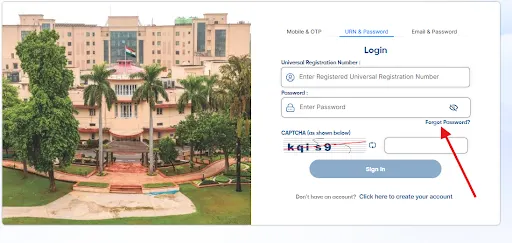
If you forget Unique Registration Number after creating your account, follow these steps given below.
Step 1: Click on Forget Password as shown below with the arrow.
Step 2: Enter your Email id and Mobile Number, which you filled while creating your unique registration number (URN) as shown below.
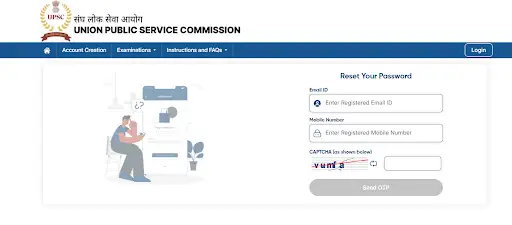
Step 3: Fill the captcha as shown and click on the Send OTP Button.
Step 4: Enter the OTP that you have received in SMS and Email.
Step 5: Click on Verify OTP and your unique registration number will be sent to your mobile number.
Step 6: Reset your password and save your URN number and password for login purposes.
Mistakes in Personal Information
Filling personal details correctly is extremely important because UPSC verifies all information during document verification. Even small spelling mistakes can create serious problems later. Personal details must match official certificates exactly. Read the detailed UPSC Notification 2026 before filling the application form.
- Incorrect spelling of candidate’s name.
- Wrong date of birth entry.
- Errors in parents’ names.
- Mismatch between application details and Matriculation certificate.
- Incorrect educational qualification details.
Make sure to verify all these details twice or thrice while filling the UPSC Application Form 2026 as there is no correction window to correct these details, and any error might lead to rejection of the application form or candidature at later stages of the examination.
Also Check: UPSC Correction Window 2026 Update


Incorrect Category Selection
Category selection directly affects reservation benefits and eligibility criteria. Many aspirants select the wrong category without checking certificate validity or government rules. UPSC strictly verifies category certificates during later stages.
Category Selection Problems
- Selecting the wrong category such as OBC, EWS, SC, or ST.
- Uploading expired OBC or EWS certificates.
- Not understanding creamy layer rules.
- Assuming reservation benefits without valid documentation.
- Losing candidature due to incorrect category claims.
How to avoid this issue?
Make sure to have the OBC/EWS Certificate, which must fulfil all these criteria.
OBC (Non-Creamy Layer) Certificate - UPSC CSE 2026
- OBC candidates must submit a Non-Creamy Layer (NCL) certificate for UPSC CSE 2026.
- The certificate must be based on income details of three financial years:
- FY 2022–23
- FY 2023–24
- FY 2024–25
- The certificate must be issued on or after 1 April 2025.
- Certificates issued before this date will not be accepted by UPSC.
EWS Certificate - UPSC CSE 2026
- Candidates applying under Economically Weaker Section (EWS) must submit a valid Income & Asset Certificate.
- The certificate must be based on financial year 2024–25 income and asset details.
- It must be issued on or after 1 April 2025.
- The certificate must be issued before the application closing date.
- Certificates issued after the closing date will not be considered valid.
Photo and Signature Upload Problems
Uploading photographs and signatures correctly is one of the most sensitive steps in the UPSC application process. Many candidates ignore image specifications and upload incorrect files. UPSC may reject applications silently if images do not follow UPSC Photo and Signature Guidelines 2026.
Common Photo Upload Issues
- Uploading images in wrong format (PNG or PDF instead of JPG).
- Incorrect file size or dimensions.
- Blurred or unclear photographs.
- Improper background or lighting.
- Uploading old or edited photographs.
Live Photo Capture & Signature Issues
- Poor lighting while capturing live photo.
- Face not clearly visible during live capture.
- Signature not written three times vertically.
- Uploading unclear or blurred signature images.
- Application rejection due to mismatch between live photo and uploaded photo.
Solution for Photograph Upload Issues
- Upload the photograph only in JPG format. Other formats like PNG or PDF are not accepted.
- Ensure the photo file size is between 20 KB and 200 KB.
- Use a recent colour passport-size photograph taken in formal style.
- Keep the background plain white without shadows or patterns
- Make sure the face covers about 75% (3/4th) of the photograph.
- Upload a front-facing photo with head properly centered.
- Both ears and facial edges should be clearly visible.
- Keep eyes open and maintain a neutral facial expression.
- Avoid wearing sunglasses, coloured glasses, or fancy accessories.
- Do not upload edited, filtered, or digitally modified photographs.
- Make sure the photograph is clear, sharp, and properly lit.
Solution for Live Photo Capture Problems
- Capture the live photograph in a well-lit environment.
- Sit directly facing the camera and keep your face clearly visible.
- Avoid shadows on the face or background.
- Ensure the camera is stable and not shaking.
- Use the “View Photo” option to check clarity before submission.
- Make sure the live photograph matches the uploaded passport-size photograph.
- You can capture the live photo using:
- Laptop or desktop webcam
- Mobile camera by scanning the QR code
Solution for Signature Upload Issues
- Sign your signature three times vertically (one below the other).
- Use only a black ink pen.
- Sign on a plain white sheet without lines or colour background.
- Maintain proper spacing so all three signatures are clearly visible.
- Scan all three signatures together in one single image file.
- Save the file in JPG format with the name “signature”.
- Ensure the signature file size is between 20 KB and 100 KB.
- Maintain image dimensions between 350 to 500 pixels.
- Make sure the signature image is clear, properly oriented, and not rotated.
Wrong Choice of Examination Centre
Selecting the correct exam centre is very important for convenience and travel planning. UPSC provides centres on a first-come-first-serve basis. Many aspirants do not check availability and later face difficulties.
- Examination Centre Selection Problems
- Selecting distant centres due to late form filling.
- Ignoring travel convenience and accommodation availability.
- Choosing centres without checking seat availability.
- Facing last-minute travel stress.
Solution to Wrong Choice of Examination Centre
- Fill the Application Form Early: Apply as soon as the UPSC form is released to get your preferred exam centre, as centres are allotted on a first-come-first-serve basis.
- Choose a Convenient and Nearby Centre: Select a centre close to your residence or a location where travel and accommodation are easily available to avoid last-minute stress.
- Check Travel and Stay Arrangements in Advance: Before selecting the centre, ensure proper transport connectivity, exam city familiarity, and availability of accommodation if required.
Payment-Related Issues
Payment of application fees is another major step where aspirants face problems. Many candidates experience failed transactions or confusion about payment status. UPSC considers the application complete only after successful fee payment.
Common Payment Problems
- Payment failure due to bank server or internet issues.
- Money deducted but payment status shows incomplete.
- Confusion regarding fee exemption rules.
- Not checking payment confirmation receipt.
- Fee Payment Confusion
Many aspirants wrongly assume that fee payment can be done later or that failed payment is acceptable. UPSC clearly states that the application is valid only after successful payment.
Fee Payment Mistakes
- Filling form but not completing payment.
- Assuming deducted amount means successful submission.
- Ignoring payment confirmation messages.
- Missing deadline due to payment confusion.
Solution to Payment-Related Issues in UPSC Application Form 2026
- Complete Payment Immediately and Verify Status: Always pay the application fee while filling the form and check whether the payment status shows “Successfully Submitted”. The application is considered valid only after successful fee payment.
- Use Stable Internet and Reliable Payment Method: Make payment using a strong internet connection and trusted banking method to avoid transaction failure. If money is deducted but status shows incomplete, check payment history and try again if required.
- Check Fee Exemption Rules and Keep Receipt Safe: Confirm whether you are eligible for fee exemption before payment and always download or save the payment confirmation receipt for future reference.
Technical Glitches and Slow Website Issues
UPSC website traffic increases heavily near the last date of application submission. This leads to server slowdown, login errors, and payment failures. Candidates who wait until the final day face maximum technical difficulties.
Technical Problems Faced by Aspirants
- Website server overload near deadline.
- Slow loading of application pages.
- Payment gateway crashes.
- Form submission errors.
- Login session timeout issues.
Solution to Technical Glitches and Slow Website Issues
- Fill the Application Form Well Before the Deadline: Submit the form in the initial days to avoid server overload, slow website speed, and payment failures caused by heavy traffic near the last date.
- Apply During Off-Peak Hours: Try filling the UPSC application form late at night or early in the morning, as the website is usually less busy during these hours and works faster compared to daytime.
- Use Stable Internet and Save Progress Regularly: Use a reliable internet connection, avoid multiple refreshes, and save each step properly to prevent session timeout and form submission errors.
Prabitha Setu Consent Confusion
UPSC introduced the Prabitha Setu Portal for data sharing and recruitment support. Many aspirants select consent options casually without understanding long-term implications. Once selected, this decision cannot be changed later.
Problems Related to Prabitha Setu Consent
- Candidates select Yes or No without reading details.
- Decision becomes irreversible after submission.
- No option for partial data sharing.
- Aspirants regret casual selection later.
Solution to Prabitha Setu Consent Confusion
- Read Consent Details Carefully Before Selecting: Understand the purpose of the Prabitha Setu Portal and its data sharing terms before choosing Yes or No. Do not select the option in a hurry.
- Make an Informed and Final Decision: Remember that the consent choice cannot be changed later and partial data sharing is not allowed, so select the option only after proper understanding.
Service Preference Filled Casually
Service and cadre preferences are filled during the Detailed Application Form (DAF) after clearing the Prelims exam. Many aspirants underestimate its importance and fill preferences randomly. Once DAF is submitted, UPSC does not allow changes. Choose the service preference from the UPSC Post List 2026.
Service Preference Mistakes
- Filling service order without proper research.
- Ignoring cadre allocation rules.
- Not considering career goals before preference selection.
- Regretting choices after final selection.
Solution to Service Preference Filled Casually
- Research Services and Cadres in Advance: Before filling the DAF, study different services, job roles, career growth, and cadre allocation rules so that preferences are based on informed decisions, not assumptions.
- Align Preferences With Long-Term Goals: Choose service and home cadre preferences by considering your career interests, work-life balance, and future aspirations, as no changes are allowed after final submission.
One-Time Correction Illusion
UPSC clearly mentions that major corrections are not allowed after final submission. However, many aspirants assume there will be a correction window. Due to this misunderstanding, candidates rush through the form and make permanent errors.
Common Irreversible Mistakes
- Wrong category selection.
- Incorrect attempt count.
- Uploading incorrect documents.
- Entering wrong personal information.
Solution to One-Time Correction Illusion
- Fill the Application Form Carefully and Verify Details Multiple Times: Do not rush while filling the form. Cross-check category, attempt count, personal details, and uploaded documents before final submission.
- Understand UPSC Rules and Keep Documents Ready: Read the official notification carefully and keep all certificates and details prepared in advance, as UPSC generally does not allow major corrections after final submission.
Attempt Count Confusion
Many aspirants remain confused about attempt counting rules in UPSC. Some candidates think filling the application form counts as an attempt. However, UPSC counts an attempt only when the candidate appears in the Preliminary Examination.
Attempt Count Misunderstandings
- Believing form filling equals attempt usage.
- Fear of losing attempt due to incorrect information.
- Not understanding category-wise attempt limits.
- Panic among first-time aspirants.
Solution to Attempt Count Confusion
- Understand UPSC Attempt Rules Clearly: Remember that an attempt is counted only if a candidate actually appears in the Preliminary Examination. Simply filling or submitting the application form does not count as an attempt.
- Check Category-Wise Attempt Limits Before Applying: Carefully read UPSC guidelines regarding attempt UPSC Age Limit for General, OBC, SC/ST, and PwBD categories to avoid unnecessary fear and confusion while applying.

 Last updated on Oct, 2026
→ UPSC 2027 Notification will be released on 13 January 2027 at upsconline.nic.in.
→ Check Nobel Prize 2026 Winners List here.
→ Download PIB PRiSM Monthly Magazine 2026 here.
→ Check UPSC Monthly Current Affairs Magazine The Recitals here.
→ Check out the latest UPSC Syllabus here.
→ Download UPSC Model Answers for Mains 2026
→ UPSC Mains Question Paper 2026 is out now for Essay & GS Paper 1, 2, 3 & 4.
→ UPSC Calendar 2027 has been released.
→ Enroll in Vajiram & Ravi’s UPSC Mains Test Series 2027 for structured answer writing practice, expert evaluation, and exam-oriented feedback.
→ Join Vajiram & Ravi’s UPSC Mentorship Program 2027 for personalized guidance, strategy planning, and one-to-one support from experienced mentors.
→ Go through the UPSC Mains Previous Year Papers to enhance your preparation.
→ UPSC has released UPSC Toppers List 2025 with the Civil Services final result on its official website.
→ Also check Best UPSC Coaching in India
Issues Faced by UPSC Aspirants While Filling the UPSC Application Form 2026 FAQs
Q1. Does filling the UPSC application form count as an attempt?+
Q2. What should I do if I forget my UPSC URN (Unique Registration Number)?+
Q3. Can I correct mistakes in the UPSC application form after final submission?+
Q4. What happens if my photo or signature does not meet UPSC guidelines?+
Q5. Is the UPSC application considered complete without fee payment?+
Tags: issues faced by upsc issues faced by upsc aspirants while filling the upsc application form 2026 UPSC upsc 2026 upsc application form 2026 upsc form 2026